cd ..
EN
Networking
What is DNS and Why is it the Key to the Internet?
R
Rodolfo Echenique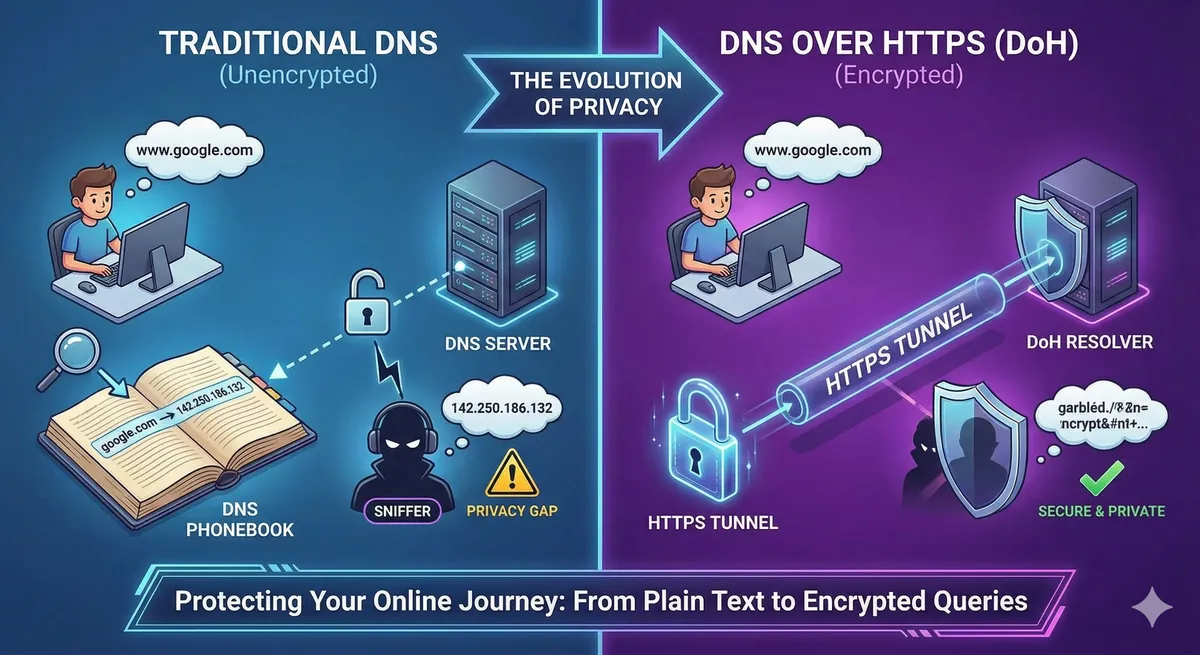
Automated Translation: This article was originally written in Spanish and translated by Gemini AI.
Imagine a world without contact lists on your phone. Every time you wanted to call someone, you would have to remember their full phone number. Unthinkable, right? For computers, it's exactly the same. They communicate using IP addresses (like 192.168.1.1), which are numeric sequences difficult for us humans to remember.
This is where the Domain Name System (DNS) comes into play. Think of DNS as the "Internet phone book." Its main function is to translate human-readable domain names (like ) into the IP addresses that machines understand.
www.google.comWhen you type into your browser, DNS is responsible for finding the corresponding IP address so your computer knows where to connect. Without DNS, you would have to remember something like to visit Google. Impossible given the number of websites we use daily!
www.google.com142.250.186.132The Journey of Your DNS Query: How Does It Work?
The process is fascinating and happens in milliseconds:
- Your Query: When you type into your browser, your computer sends a request to a DNS server (usually your internet service provider's).
www.google.com - The Translation: This server acts as a "translator." If it doesn't have the IP saved, it searches other DNS servers until it finds the numerical address associated with .
google.com - The Response: Once it finds the IP (for example, ), the DNS server sends it back to your computer.
142.250.186.132 - Direct Connection: With the IP in hand, your browser can now establish a direct connection with the Google server and load the webpage.
It's like asking a telephone information service to give you a store's number by name, and then using that number to call the store directly.
The Achilles' Heel of Privacy: Why Was DoH Born?
Traditionally, DNS queries and responses have been sent in plain text and unencrypted, primarily via the UDP protocol. This means that:
-
Vulnerability to Interception: Any person or entity capable of monitoring your network (your internet provider, a network administrator, an attacker on a public Wi-Fi network, or even governments) can see exactly which websites or services you are querying.
-
Security and Privacy Risks:
-
Censorship and Surveillance: In authoritarian regimes, this facilitates censorship by blocking queries to certain sites, or mass surveillance of citizens' online activities.
-
Targeted Attacks: An attacker could intercept your DNS queries to redirect you to fake websites (phishing) or monitor your browsing behavior for future attacks.
While HTTPS encrypts the content of communication with a website once you connect, the initial DNS query (to know where to go) has always been visible. This creates a significant privacy gap at the start of every online interaction.

La Solución Cifrada: DNS over HTTPS (DoH)
To close this gap, two key standards emerged: DNS over TLS (DoT) and DNS over HTTPS (DoH). Both pursue the same goal: to encrypt DNS queries and responses.

What specifically does DNS over HTTPS (DoH) do?
DNS over HTTPS (DoH) takes DNS queries and their responses to a higher security level by encrypting them within the HTTP or HTTP/2 protocol. In simpler terms:
- Traffic Hidden in Web Traffic: DoH "camouflages" DNS queries as if they were normal, encrypted web traffic (HTTPS). This means an external observer cannot distinguish them from the rest of your encrypted browsing.
- Protection Against Attacks: Being encrypted and mixed with HTTPS traffic, DoH queries are much harder for third parties to intercept, read, or manipulate. An attacker can no longer see which sites you are trying to visit or easily redirect you.
This approach not only increases your privacy while browsing but also hinders DNS-level censorship and protects your connections from DNS manipulation attacks.
Conclusion: A Crucial Step Towards a Safer Internet
In today's landscape, where information security and privacy are more critical than ever, technologies like DNS over HTTPS (DoH) are fundamental tools. By encrypting something as basic as DNS queries, DoH adds a vital layer of protection, shielding the start of your online interactions against prying eyes and malicious manipulation.
Implementing or configuring DoH on your devices or networks (if possible) is a proactive step to strengthen your digital security and contribute to a more private and resilient Internet experience.
Press play! ▶️ We have turned this topic into a conversation you can listen to on our YouTube podcast