cd ..
EN
Security
The Definitive Security Guide for your Active Directory
R
Rodolfo Echenique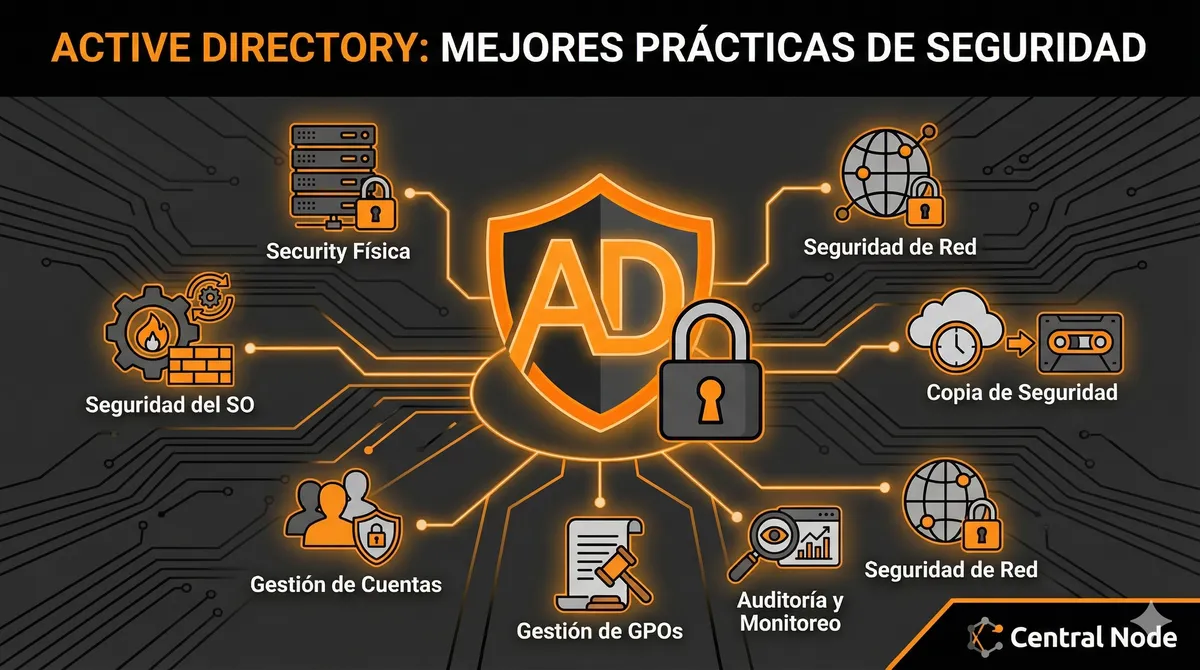
Automated Translation: This article was originally written in Spanish and translated by Gemini AI.
Active Directory (AD) lies at the heart of most corporate IT infrastructures. It is the system that manages users, computers, resources, and security policies, making it a prime target for cyber attackers. Protecting your Domain Controllers (DCs) and maintaining the security of your AD is not just good practice; it is fundamental to the survival and integrity of your business.
In this guide, we will break down the essential security measures and best practices you must apply to strengthen your Active Directory environment and minimize risks.
1. Physical Security of Domain Controllers
Domain Controllers (DCs) are critical servers, and their protection begins with physical security.
- Restricted Access: Locate DCs in secure server rooms, with access limited only to authorized personnel. Implement controls such as multifactor authentication (MFA), access cards, or biometrics.
- Environmental Monitoring: Install monitoring systems for temperature, humidity, and power, preventing physical failures that could compromise the service.
- Power Protection: Use Uninterruptible Power Supplies (UPS) and consider power redundancy to ensure continuous availability.
2. Domain Controller Operating System Security
The foundation upon which AD operates must be unassailable.
- Minimal Installation: Install the Active Directory Domain Services (AD DS) role on the lightest possible version of Windows Server (Server Core if feasible) to reduce the attack surface.
- Firewall: Configure the Windows Firewall (or your perimeter network firewall) to allow only the essential traffic for AD roles (LDAP, Kerberos, DNS, RPC, etc.) and block everything else.
- Antivirus/Antimalware: Implement and keep antivirus/antimalware software updated on all DCs. Ensure you configure Microsoft's recommended exclusions for AD folders and processes to prevent performance and stability issues.
- Patches and Updates: Keep the DC operating system and software fully updated with the latest security patches and cumulative updates. Automate this process, but always with a solid contingency plan.
- Software Restriction: Never install unnecessary software on DCs! They must be dedicated exclusively to AD DS.
- Security Baselines: Apply security configurations recommended by Microsoft (e.g., using Microsoft Security Baselines or CIS Benchmarks) to strengthen the operating system's security posture.
3. Account and Privilege Management
Identity and access management is the pillar of AD security.
- Principle of Least Privilege: Grant users and services only the permissions strictly necessary for their functions. Avoid unnecessary highly privileged accounts.
- Protected Administrator Accounts:
- Tiering Model: Implement a tiering administration model (Tier 0 for DCs, Tier 1 for servers, Tier 2 for workstations) to isolate domain administrator accounts and reduce the risk of lateral movement.
- Secure Workstations (PAWs/SAWs): Use dedicated, clean, and highly secure administrative workstations for all domain administration tasks.
- Just-in-Time (JIT) / Just-Enough-Administration (JEA): Consider solutions that provide elevated access only when necessary and for a limited time, reducing the window of opportunity for attacks.
- Password Rotation: Enforce complex, unique passwords and expiration periods. Implement account lockout policies after several failed attempts.
- Multifactor Authentication (MFA): Implement MFA for all administrative accounts, especially those with access to critical systems.
- Account Deactivation/Deletion: Quickly disable or delete accounts of users who leave the organization or change roles.
- Privileged Account Monitoring: Closely monitor the activity of highly privileged accounts to detect any anomalous behavior.
4. Group Policy Object (GPO) Management
GPOs are a powerful tool but also a possible attack vector if not managed correctly.
- Principle of Least Privilege for GPO: Strictly limit who can create, edit, and link GPOs.
- GPO Design: Design granular GPOs to apply specific configurations to specific groups of users or computers. Avoid large, monolithic GPOs.
- Link GPOs at the Lowest Possible Level: Apply GPOs to more specific Organizational Units (OUs) instead of linking them to the domain root, which reduces their impact and simplifies troubleshooting.
- GPO Change Monitoring: Use tools to audit and monitor any changes in GPOs, especially those affecting security.
- Documentación: Maintain clear documentation of all GPOs, their purpose, and the objects to which they apply.
5. Auditing and Monitoring
Robust auditing and monitoring are essential for early threat detection.
- Enable Comprehensive Auditing: Configure security audit policies to log critical events such as:
- User/group account changes (creation, modification, deletion).
- Logon/logoff (successful and failed).
- Changes in GPOs.
- Access to privileged objects (files, folders, registry keys).
- Service account activity.
- Centralized Log Collection: Centralize security logs from all DCs and other critical servers in a SIEM (Security Information and Event Management) system or a log collector for more efficient analysis and correlation.
- Alerts: Configure alerts for suspicious events (e.g., multiple failed logons, unexpected permission changes, etc.).
- Regular Log Review: Review security logs regularly to identify anomalous patterns or malicious activity.
6. Backup and Disaster Recovery
The ability to recover Active Directory is vital for business continuity.
- Frequent Backups: Perform regular and tested backups of the system state of the DCs.
- Authoritative vs. Non-Authoritative Restore: Understand the difference between restoration types (authoritative to restore deleted objects, non-authoritative to restore the DC to a previous point without overwriting current objects).
- Disaster Recovery Plan (DRP): Periodically develop and test a detailed DRP for Active Directory, ensuring you can restore the service in case of a disaster.
- Secure Backup Storage: Store backups securely, preferably in a separate location and with protection against ransomware (immutable, offline, etc.).
7. Network Security
The network supporting AD must be as secure as AD itself.
- Network Segmentation: Segment your network to isolate DCs and other critical servers into an elevated security zone.
- Secure Protocols: Use SMB Signing, LDAP Signing/LDAPS, and Kerberos for secure communications. Disable obsolete or insecure protocols (e.g., NTLM if possible, SMBv1).
- Secure DNS: Protect your DNS servers, as they are critical for the operation and name resolution in AD.
- VPN for Remote Access: If remote access to DCs or administration tools is needed, use secure VPNs with MFA.
8. Additional Considerations
- Offline DC: Consider keeping an offline DC for use in extreme disaster recovery scenarios, protecting it from online attacks.
- Ransomware Protection: Implement endpoint detection and response (EDR) solutions and ensure that DCs are not vulnerable to ransomware attacks.
- AD Schema Updates: Carefully plan and test any Active Directory schema updates, as they can have a significant impact.
- Performance Monitoring: Monitor the performance of the DCs to detect performance issues that may indicate security or configuration problems.
- Security Assessments (Pen Testing/Vulnerability Scans): Conduct periodic penetration tests and vulnerability scans in your AD environment to identify weaknesses.
Active Directory security is an ongoing process that requires constant vigilance and adaptation. By implementing these best practices and staying up-to-date with the latest threats, you can build a more robust, resilient, and secure Active Directory environment for your organization.
At Central Node, we specialize in the security and management of critical infrastructures like Active Directory. If you need assistance auditing, implementing, or improving the security of your environment, contact us today!